LINE UP! - A game for the CASIO fx-9860GII
A downloadable thing
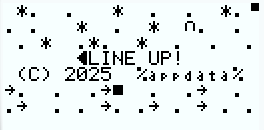
LINE UP! is an arcade-styled video game made for the CASIO fx-9860GII graphing calculators! It's pretty lightweight, as it only takes up 3,200 Bytes of storage! It is divided into two programs.
REQUIREMENTS :
- A computer with Windows
- A calculator (link : https://www.casio.com/intl/scientific-calculators/product.FX-9860GII/ )
- FA-124 (link : https://edu.casio.com/forteachers/er/software/ )
INSTALLING THE GAME :
Download LINEUPXX.g1m. XX corresponds to the version number.
Install and open CASIO FA-124.
Connect your calculator to your PC using the USB port or the COM port.
Click on the connect button in the Calculator window, then on the Storage button.
Drag and Drop the LINEUPXX.g1m file in the Calculator window.
Disconnect the calculator.
On the calculator, go in the MEMORY tab, then in Storage Memory.
Copy LINEUPXX.g1m (Select the file, press F1, then F2).
Go in the PRGM tab.
Use INITLINE to initialize the "L" matrix, this will erase your score and initialize the game.
Then use LINE UP to play the game!
HOW TO PLAY?
Use F1 to move left, F6 to move right.
Use MENU to pause the game (this might be buggy).
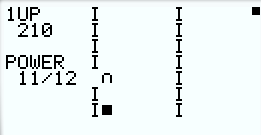
Align the magnet with the block. For every frame where the magnet is on the same column as the block, you get 50 points (150 if your POWER bar is at max). After you get 10000 points, these values go up to 200 and 500 points.
THE POWER BAR?
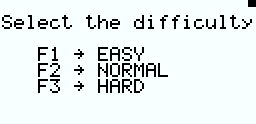
The POWER bar is a value in the game, it is located at the left of the screen. It can go up to 8, 10, or 12, depending on the difficulty. For every frame where the magnet is on the same column as the block, you get 1 POWER point. For every frame where the magnet ISN'T on the same column as the block, you LOSE 1 POWER point. If your POWER bar gets to 0, you lose the game. Your goal is to get the highest score.
SIMPLE TROUBLESHOOTING :
The game shows "Dimension Error"!
You might not have the right calculator
The game doesn't have any sound!
The CASIO fx-9860GII doesn't have sound hardware.
The game is slow!
Delete a few other programs, your calc might be too full!
The "pause" control doesn't work!
Spam it :)
That's about it, for any other issues, comment them down below.
Thanks for playing :)
Download
Install instructions
Download LINEUPXX.g1m. XX corresponds to the version number.
Install and open CASIO FA-124. Connect your calculator to your PC using the USB port or the COM port.
Click on the connect button in the Calculator window, then on the Storage button.
Drag and Drop the LINEUPXX.g1m file in the Calculator window.
Disconnect the calculator.
On the calculator, go in the MEMORY tab, then in Storage Memory.
Copy LINEUPXX.g1m (Select the file, press F1, then F2).
Go in the PRGM tab.
Use INITLINE or INIT APP (depending on your version) to initialize the "L" matrix, this will erase your score and initialize the game.
Then use LINE UP to play the game!
Development log
- V30 (Final V2) Update !84 days ago
- V30 (Final V2) Update TeaserApr 01, 2026
- LaunchJan 09, 2026